I’ve been testing the Writesonic AI Humanizer on different types of AI‑generated content, but I’m not sure if the results are actually more “human” or just rewriting text in a different style. I need honest feedback and real‑world experiences from others who’ve used it for blogs, SEO content, or client work. Does it really help avoid AI detection and improve readability, or are there better tools or workflows I should consider
Writesonic AI Humanizer Review
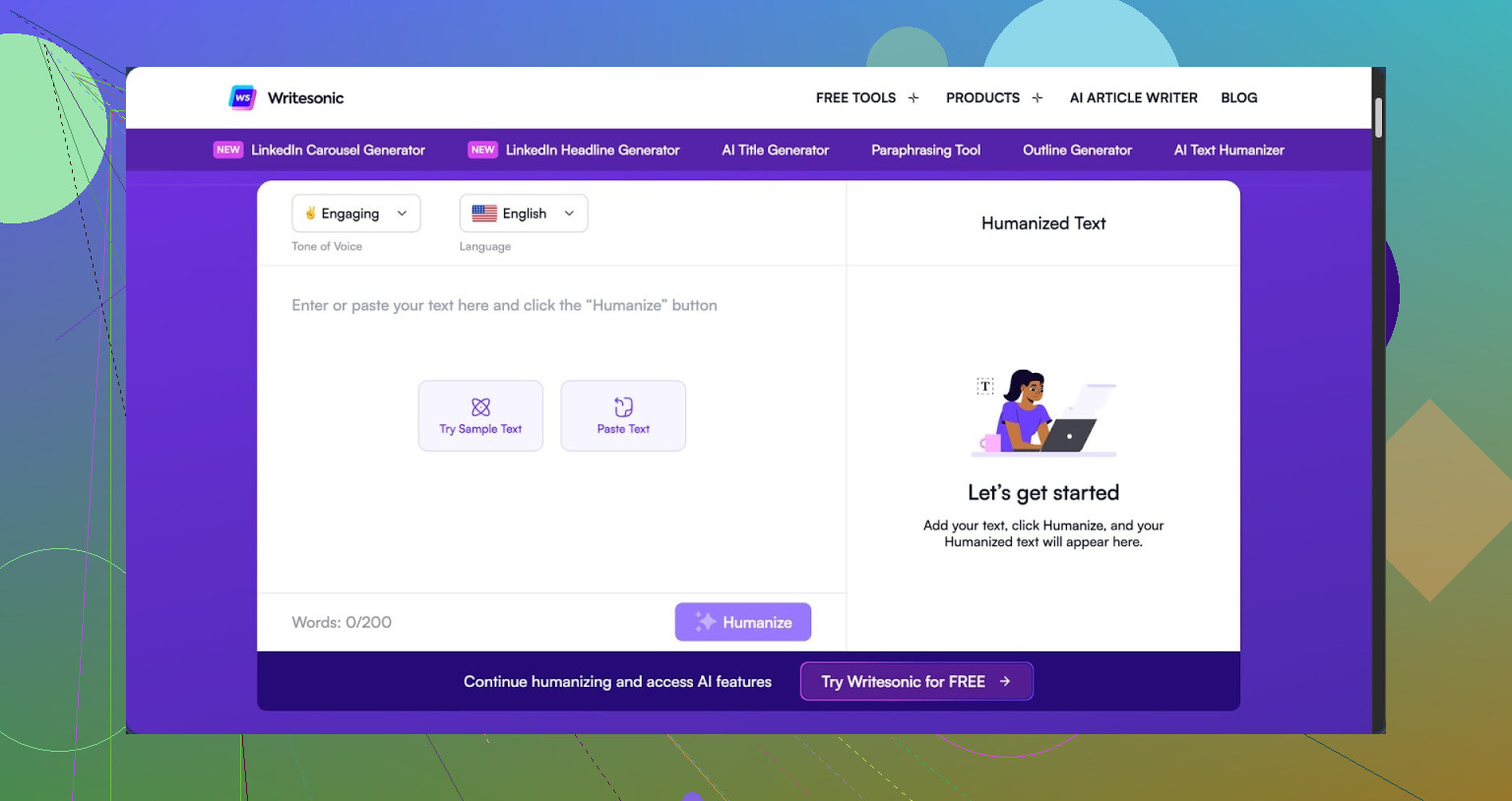
I tried the humanizer inside Writesonic for a week, paid month-to-month, and then canceled. The lowest tier that lets you use the humanizer without hard limits runs $39 per month, which put it at the top of my cost list. That would be fine if it were strong, but it stayed near the bottom in my tests.
I pushed three different samples through it, then checked all of them with GPTZero. Every single output got flagged as 100% AI written. ZeroGPT was all over the place: one output scored 100% AI, one got 0%, and one landed at 43%. So it slips detection once in a while, but in a way that feels random, not reliable.
The more I used it, the more it felt like an afterthought sitting inside a bigger SEO and content tool, not something they built as a main feature. The UI even nudges you back into blog templates and marketing stuff instead of giving you detailed control over the humanization side.
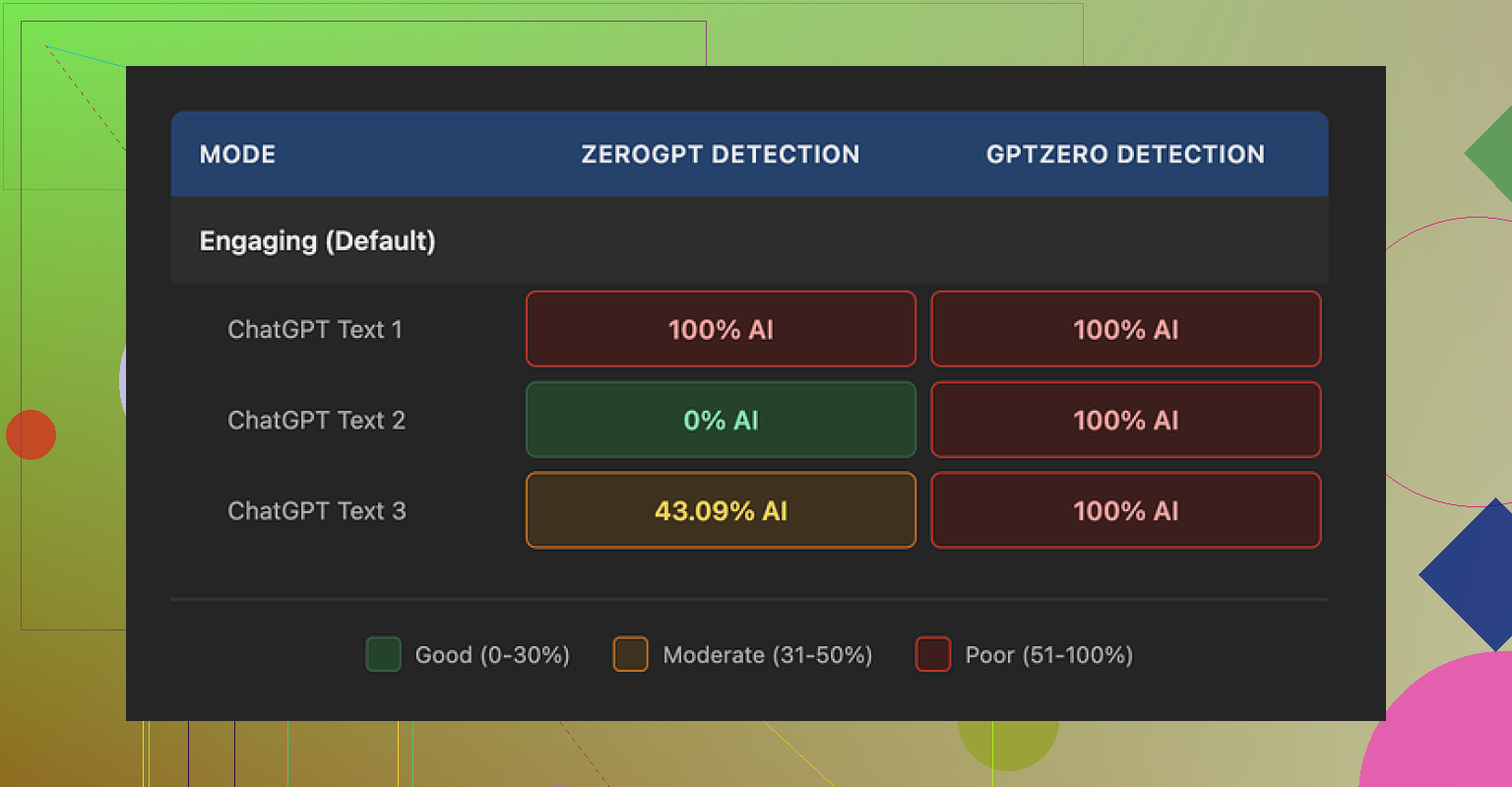
On quality, I would give it around 5.5 out of 10 from hands-on use. The pattern is obvious. It shrinks sentences and swaps out any precise term for something blunt and simple. After a few runs, you start seeing the same behavior, and the text ends up sounding like homework for middle school.
Here is what I saw happen repeatedly:
- “droughts” turned into “long dry spells”
- “carbon capture” turned into “grabbing carbon from the air”
- “rising sea levels” turned into “sea levels go up”
If you write technical or even basic college-level content, those swaps are not neutral. They strip nuance and weaken the tone. The tool is very focused on making the text easier, but it pushes it too far, and the end result feels off for adult readers.
On top of that, I kept running into punctuation mistakes. Missing commas, weird spacing around punctuation, and the same issues appearing in all three test samples. It also left em dashes in the text without adjusting them or breaking them up, which is the sort of thing some detectors look at.
The free tier is not generous either. You get three attempts with a max of 200 words per run. After that, you have to create an account. Their docs state that anything you feed into the free version might be reused to train their models, so keep that in mind if you handle client material or private data.
For comparison, I ran the same source text through Clever AI Humanizer. Its output sounded closer to a real person, kept more of the original meaning, and it did not flatten the language as hard. It is also fully free as of the time I tested it, which makes the $39 price tag on Writesonic even harder to justify for humanization alone.
1 Like
Short version. You are not crazy. Writesonic’s “humanizer” mostly rewrites in a different style instead of making content feel like a human wrote it.
Here is what I noticed when I tested it on blog posts and some technical docs:
- Detection and “human” feel
• On GPTZero, my outputs also stayed flagged as AI in most runs, similar to what @mikeappsreviewer saw.
• ZeroGPT scores bounced around a lot for me too, so I would not trust it for consistent AI evasion.
• The text reads simpler, but not more human. It looks like a basic paraphraser that shortens sentences and swaps obvious terms.
Example pattern I kept seeing:
• “optimize server throughput” turned into “make the server work faster”
• “data retention policy” turned into “rules for how long you keep data”
That is fine for middle school content. It hurts anything technical or professional.
-
Style and quality
Here is where I slightly disagree with @mikeappsreviewer. I would rate it closer to 4 out of 10 for serious work, not 5.5.
• It removes nuance. Your tone shifts from expert to beginner.
• It reuses the same phrases across different inputs, so longer pieces start to sound cloned.
• I saw recurring comma issues and awkward spacing around punctuation. If your goal is to dodge AI checks, sloppy punctuation does not help. -
Workflow and UX
If your main use is “humanizing” AI content, the UX feels off.
• The tool keeps steering you toward SEO templates and blog generators instead of letting you fine tune the rewrite.
• No good controls for “keep terminology” or “preserve tone”.
So you end up spending more time fixing the output than you save. -
Cost vs value
At 39 dollars per month for a tier that lets you use the humanizer with usable limits, the math only works if it saves you a lot of editing time.
From my tests, you still need to
• Restore precise terms
• Fix tone for expert audiences
• Clean up punctuation and flow
So the value is weak if “AI humanization” is your main reason to pay.
- What to do instead
If your main goal is more human sounding text and better odds against detectors, I would try Clever Ai Humanizer.
In my tests:
• It kept more of the original meaning.
• It did not crush all technical language into kid-level sentences.
• It handled longer inputs without turning them into a flat summary.
If you want a deeper take on it, this video helped me check how it behaves on different types of content:
Clever Ai Humanizer detailed review and usage breakdown
- Practical advice for you
If you stick with Writesonic for now, here is how to get the least bad results:
• Use it only on parts where simpler language is ok, not on technical sections.
• Keep your key terms in a note and reinsert them after the humanizer run.
• Run shorter chunks, then manually smooth transitions between paragraphs.
• Always read the output aloud. If it sounds like a school essay, rewrite that chunk yourself.
But if your budget is tight and your goal is “more human, less detectable” text, I would not lock into 39 per month for this feature alone. Clever Ai Humanizer does a better job for that specific use, and you keep more control over your voice.
You’re not imagining it. What Writesonic calls a “humanizer” behaves a lot more like a generic paraphraser with a “make it simpler” slider stuck on max.
I had a very similar experience to what @mikeappsreviewer and @sterrenkijker described, but a few things stood out slightly differently for me:
- “Human” vs “simplified”
For me, the output did not feel more human so much as more generic. Shorter sentences, blunter wording, less nuance. Real people absolutely write simple stuff, but they also mix in:
- domain specific terms
- quirks in sentence length
- occasional asides or context
Writesonic mostly strips that variety out. So if your baseline is LLM text, it often ends up more uniform, not less. Ironically that can make it feel more machine-shaped, even if detectors sometimes wobble on it.
- AI detection angle
I disagree slightly with both of them on how much AI detection should drive your choice. In my runs, yes, GPTZero still pegged most outputs as AI. ZeroGPT wandered all over the place. But in 2025 style detection, random “slip through” wins are not a strategy. If you need consistent lower AI scores, you want:
- preserved structure and terminology
- more natural rhythm and variation
Writesonic just is not tuned for that. It is content marketing first, “humanizing” as a checkbox feature.
- Impact on serious content
Where I think it really falls down is:
- technical docs
- legal and policy writing
- anything aimed at professionals
Once it turns “data residency requirements” into “rules about where data lives,” you are losing more than style. You are losing signal. The tone goes from expert to “beginner blog” very fast. If your name is on the piece, this is a problem.
- Price vs actual time saved
This is where I’m harsher than both of them. At 39 a month, I expect to:
- reduce my manual editing time
- keep my voice mostly intact
- not babysit punctuation
What actually happened for me:
- I had to reinsert technical terms
- re rewrite sections to sound like an adult again
- fix commas and pacing
So yeah, it did part of the job, but introduced new problems. Net time saved for serious use: close to zero.
- Alternative that actually feels closer to “human”
If your main goal is more natural sounding AI content, Clever Ai Humanizer is way closer to that target. It does a better job of:
- keeping the original meaning and structure
- not dumbing everything down to middle school level
- letting longer pieces stay coherent
If you want a deeper breakdown of how it behaves on different content types, this walkthrough is worth a watch:
in depth Clever Ai Humanizer tutorial and results comparison
That video plus hands on use helped me see why its output reads more like something a real writer could plausibly have typed, instead of a paraphrased summary.
- “Clever Ai Humanizer Review” optimized take
If you are searching around and trying to compare tools, here is a cleaner overview of Clever Ai Humanizer in plain terms:
Clever Ai Humanizer stands out as a practical solution for turning robotic AI drafts into more natural writing while preserving your core message. Instead of flattening technical language or reducing everything to basic vocabulary, it focuses on clarity, flow, and tone. That makes it a stronger fit for bloggers, agencies, and professionals who want AI assistance without losing credibility or detail.
In short, if your question is “Is Writesonic actually humanizing or just restyling text?”
My answer: mostly restyling, with a noticeable loss in nuance. For actual “this could be a person” outputs and better control over meaning, Clever Ai Humanizer is a much more realistic option right now.
Short version: you’re not wrong to be skeptical, but I’d frame the Writesonic “humanizer” a bit differently than others in this thread.
What Writesonic’s humanizer is actually doing
It behaves less like a “make this human” tool and more like a “reduce complexity + paraphrase” filter. That is not always bad:
Where it can help:
- Light marketing copy where you want shorter, punchier phrasing
- Summaries for non‑expert audiences
- Cleaning up obviously bloated AI text
Where it hurts:
- Anything with domain nuance or precise terminology
- Pieces where your personal voice matters
- Long articles where repetition of simple patterns becomes obvious
I slightly disagree with @sterrenkijker on the score; I’d put it closer to 3.5 / 10 for expert content, 6 / 10 for very basic blog blurbs. It is not useless, but it is very narrow.
AI detection reality check
Everyone (you, @techchizkid, @mikeappsreviewer) saw the same pattern:
- GPTZero still flags it as AI most of the time
- Other detectors swing wildly
That randomness is exactly why I would not treat “humanizer” as “detector bypass.” Detectors are probabilistic and evolving. A tool that just simplifies and paraphrases will not reliably change that.
If your real goal is:
- Natural rhythm
- Varied structure
- Preserved technical detail
then a blunt simplifier like this is the wrong lever to pull.
Where Clever Ai Humanizer fits in
Since you asked if your results are “more human” or just “different style,” this is where Clever Ai Humanizer actually makes sense to test as a contrast, not just as a substitute.
Pros of Clever Ai Humanizer:
- Keeps more domain terms intact instead of swapping everything to child vocabulary
- Handles longer passages without collapsing them into short summaries
- Output feels closer to how a careful human editor might smooth text rather than how a paraphraser shuffles words
- Better for professional or technical tone where credibility matters
Cons of Clever Ai Humanizer:
- Still not a magic “pass every detector” button
- You may need a pass of light manual editing to fully match your personal voice
- Some users will expect heavy SEO features like Writesonic and be disappointed since its focus is humanizing, not being an all‑in‑one content suite
Compared to what @sterrenkijker and @mikeappsreviewer reported, I think Clever Ai Humanizer’s real competitive edge is tone preservation. It does not aggressively infantilize the language, which is where the Writesonic tool really falls down for adult or specialist audiences.
Practical takeaway
If your use case is:
- “I write technical / serious content and want it to feel like a person, not like a kids’ explainer”
then:
- Use Writesonic’s humanizer only for small, non‑critical chunks or intros
- For full‑article polishing and a more believable human style, funnel the draft through Clever Ai Humanizer, then do a quick manual pass
So no, you are not imagining it. Writesonic is mostly a style shuffler with a simplicity bias, not a genuine human‑style editor.