I accidentally deleted a folder of important family photos from an SD card, and some of the files may have been overwritten before I noticed. I need help finding reliable image recovery software that can recover deleted photos safely without damaging the card or losing more data. Looking for trusted photo recovery tools with good results on memory cards and hard drives.
I’ve had to pull deleted photos and video off cards more times than I want to count. Sometimes I trashed files by mistake. Once it was a flaky SD card after a long shoot. A couple times it was me, tired, clicking the wrong thing. After dealing with all of that, I learned one thing first. What you do in the first few minutes matters more than which recovery app you pick.
If you lost files a minute ago, stop using the card or drive. Right now. Don’t shoot more photos. Don’t copy anything onto it. Don’t reformat it again because you hope it will fix itself. Deleted data often sits there until new data lands on top of it. Keep using the card, and your odds drop fast. I learned this one the hard way.
Once the card is out and safe, these are the tools I’d look at.
1. Disk Drill
This is usually where I start. Not because it’s magic. It isn’t. I start here because it’s easy to work with and it handles the usual stuff well, SD cards, USB sticks, external drives, SSDs.
The part I kept coming back for was video recovery. A lot of apps will find video files, sure, then you open them and they stutter, cut off, or refuse to play. I saw this with drone clips and mirrorless camera footage. Disk Drill does a better job than most with fragmented recordings through its Advanced Camera Recovery mode. It also recognizes a lot of RAW image formats, which saved me once on a card full of wedding stills.
What I liked:
- Simple layout, easy to start with
- Good support for common photo and video formats
- Advanced Camera Recovery helps with split or fragmented video
- Preview option before recovery
- Runs on Windows and Mac
What got old:
- You need the paid version for full recovery
- Deep scans drag on large cards
2. R-Studio
This one feels more like a tool for people who already know what went wrong and want control. I wouldn’t hand it to somebody who has never touched recovery software before. The interface is dense. I had to slow down and read what I was doing.
Still, when a card is badly corrupted, or the partition table is a mess, this is one of the few programs I trust. I’ve had cards other apps barely recognized, and R-Studio still pulled usable files off them. It asks more from you, though. If you want a smooth beginner setup, this ain’t it.
Good stuff:
- Strong recovery results on damaged media
- Handles broken file systems better than many simpler tools
- More scan and recovery controls
- Works with a lot of storage types
Not fun:
- Takes time to learn
- Interface feels technical fast
- Price is higher than a lot of alternatives
3. PhotoRec
If you want free, this is the one I kept seeing for good reason. It’s open-source and there’s no recovery cap hanging over your head. I used it on a formatted card once when I had zero interest in paying for one more utility, and it dug up more files than I expected.
Its trick is simple. It looks for file signatures directly instead of depending on the file system. So when the card structure is trashed, it still has a shot. The downside is annoying if you recover a lot of files. Names are gone. Folder structure is gone too. You end up sorting a pile of recovered files by hand, which is not a good evening.
Why people keep it around:
- Free
- Supports a huge range of file types
- Works well on formatted or damaged cards
- Available on Windows, macOS, and Linux
The pain points:
- Command-line interface
- Original filenames usually don’t survive
- No recovered folder structure
- Sorting the output takes time
If you want a couple more names to look at, these come up a lot too.
Recuva has been around forever, and yeah, people still use it. I’d keep it for simple jobs, like deleted photos from a healthy card or drive where nothing else is broken. The interface is easy to figure out and the free version covers a lot of basic cases. I wouldn’t reach for it first on a badly corrupted SD card.
DiskDigger shows up often in photo recovery threads, especially around Android. It’s light, quick to install, and doesn’t bury you in options. For small image recovery jobs, it makes sense. For large SD cards full of RAW bursts or camera video, I don’t see people leaning on it as much.
Recovery software is only half the story, I think. After you get files back, the bigger fix is changing your routine so you don’t land here again. I started backing up cards sooner and stopped reusing anything that had shown even one weird error. Saved me stress later.
So yeah, move fast, stop writing new data to the card, and pick a tool based on how bad the damage looks. If the files haven’t been overwritten, there’s still a decent shot you’ll get at least part of them back. Sometimes most of them. Sometimes enough.
1 Like
If family photos matter, I’d sort the tools by risk level, not by popularity.
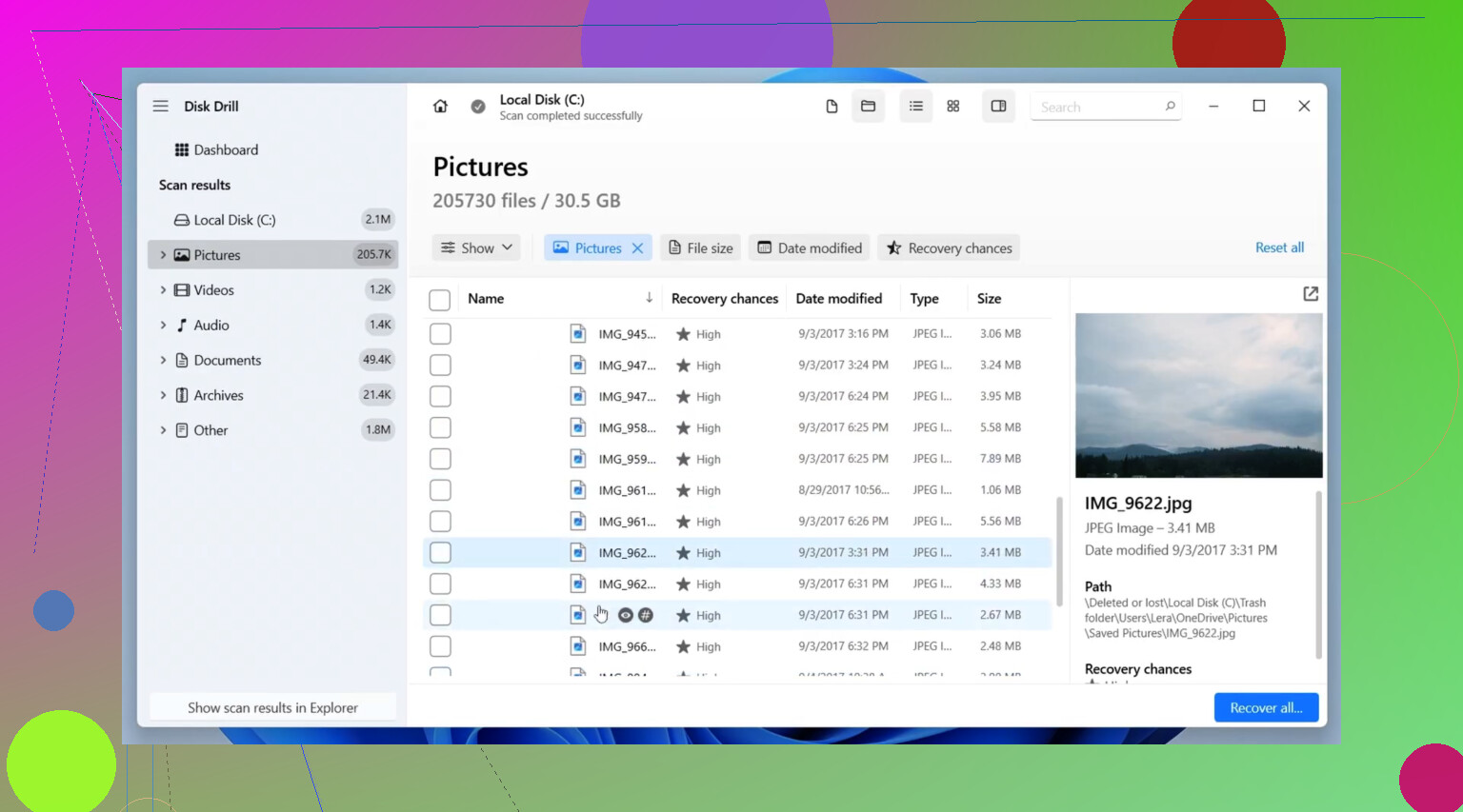
For a normal delete on a healthy SD card, Disk Drill is the safest first pick for most people. It has a clean preview, good photo format support, and it’s less likely to confuse you while you’re stressed. For image recovery software for deleted photos from an SD card, it’s one of the better starting points.
I differ a bit from @mikeappsreviewer on PhotoRec as a first try. It finds a lot, sure, but the lost filenames and folder mess is brutal when you’re recovering years of family pics. Fine as a second pass, not my first.
My order:
- Disk Drill, first scan, preview results.
- R-Photo if you want a free photo-focused option on Windows.
- PhotoRec only if the easier tools miss stuff.
- Klennet Carver if these are camera JPG/RAW files and the card got hit hard. Pricey, but strong.
One more thing. If overwrite happened, no software fixes overwritten sectors. Partial recovery is still possible, so don’t panic yet.
Also worth reading this thread on best SD card photo recovery software recommendations. It covers a few more options.
Recover to your computer, not back to the SD card. That part trips people up alot.
I’d handle this in tiers, mostly because “some files may have been overwritten” changes the math a lot.
If the card still mounts normally, I actually would not jump straight to the most aggressive carving tool. @mikeappsreviewer and @boswandelaar already covered the usual lineup, but my take is this: start with the tool that gives you the best preview quality and folder/file metadata retention, then escalate only if needed. For family photos, that matters way more than people admit.
My order would be:
-
Disk Drill
Best first pass for deleted photos on SD cards when you want a clean scan, previews, and decent support for JPG, PNG, HEIC, RAW, etc. If the card is readable, this is probly the least stressful option. It’s also one of the more practical choices if you’re specifically searching for image recovery software for deleted photos from an SD card. -
R-Photo
Kinda overlooked. Free on Windows, focused on photo/video recovery, and less messy than PhotoRec for some people. -
PhotoRec
I only use this when I’ve accepted chaos. Great at finding stuff, terrible at organization.
One thing I slightly disagree on with a lot of forum advice: people overrate “more recovered files” as the main metric. If you get 8,000 unnamed files dumped into random folders, that can be a nightmare. Sometimes the “best” recovery app is the one that gives you fewer junk results and more usable ones.
Also, if you haven’t already, make a byte-for-byte image of the SD card first if possible, then scan the image instead of the original card. Safer, less chance of making things worse.
For extra reading, this is a solid roundup of real user feedback on Disk Drill photo recovery.
And yeah, recover everything to your computer or an external drive, not back to the SD card. People do that once, then cry once lol.
I’d split this by what “overwritten” really means.
If you only deleted the folder and then noticed pretty fast, recovery odds can still be decent. If you kept shooting photos or copying files onto that same SD card, no app can recover sectors that were truly overwritten. That part I slightly disagree with in a lot of recommendations here, because people focus too much on brand names and not enough on the overwrite reality.
My take:
- First priority: stop touching the card
- Second priority: if possible, clone/image the SD card before testing tools
- Third priority: use one tool for a metadata-friendly pass, then a carver only if needed
On software, Disk Drill makes sense as a first pass if the card is still readable.
Pros of Disk Drill
- easy preview, which matters a lot for family photos
- supports common image formats and many RAW types
- less intimidating than more technical tools
- good for a first pass when you want usable results, not chaos
Cons of Disk Drill
- full recovery is paid
- deep scans can return lots of duplicates
- if files were partly overwritten, previews may look better than final recovered files
Where I differ a bit from @boswandelaar, @techchizkid, and @mikeappsreviewer is this: I would not keep hopping between 5 apps on the original SD card. That can get messy fast. Test on an image file whenever possible.
If Disk Drill misses too much, then try:
- R-Photo for a simpler free photo-focused option
- PhotoRec only when you’re okay with lost filenames/folder structure
- R-Studio if the card itself seems corrupted, not just deleted
Best-case goal is not “recover everything.” It’s “recover the most intact files with the least extra damage and sorting.” That usually leads to better outcomes.