My SD card suddenly stopped showing most of my photos and videos after I moved files to my computer, and now I’m worried they may be lost. I need help finding the best SD card recovery software that is safe, effective, and easy to use so I can recover important files without making things worse.
I’ve been in this spot before, and the first move is simple. Stop using the SD card now. Pull it out of the phone or camera and set it aside. Deleted files and formatted cards usually aren’t wiped right away. The system marks the space as free, and new writes are what tend to kill your chances.
I skipped the recovery lab route because the price was rough. Home recovery software made more sense, and in my case it worked. Out of the stuff I tested, the one I kept coming back to was Disk Drill. It runs on Windows and Mac. The layout is easy enough that you don’t need to spend an hour figuring out where the scan button is.
Where it helped me most was camera media. A lot of recovery apps do fine with basic JPGs and small files, then fall apart on RAW formats like CR2, CR3, ARW, or NEF. Video is worse. GoPro clips, drone footage, mirrorless camera files, stuff like that often gets split into pieces across the card. Some tools pull those pieces back as one broken file, which looks nice in the results list and then won’t open. Annoying as hell.
Disk Drill has an Advanced Camera Recovery mode for this kind of mess. It tries to rebuild fragmented photo and video files into something usable. You’re able to scan the card for free and preview what turns up. On Windows, there’s also up to 100MB of free recovery, which is enough to test it before spending money.
If you want other options, here’s the short version I’d give on a forum thread after trying too many of these things.
- R-Photo: Windows only, free for personal use, focused on photos and videos. I liked the thumbnail preview because you see what you’re saving before doing extra work. It won’t help with documents, archives, or random office files. For media recovery, though, it punches above its price, which is zero.
- Recuva: Good for basic file recovery on Windows. It’s simple, free, and fast enough. I’d only trust it for light jobs. If the card shows up as RAW, the file system is damaged, or the card came from a camera writing complicated RAW and video data, results tend to get bad fast.
- DiskGenius: More of a toolbox than a clean recovery app. It has disk management features and a solid FAT32 scanner, which matters because lots of SD cards use FAT32. I found the interface messy, like too many panels fighting each other. Also, the free version only recovers tiny files up to 64 KB, so full-size photos are out unless you pay.
- DiskDigger: This one matters if you’re stuck on Android and don’t have a PC nearby. Native Android recovery apps are rare, so it fills a gap. If you do have a computer, I’d still go desktop first. The desktop version has free recovery, but the forced 5 second delay between each saved file gets old real fast. typo or not, it’s kind of brutal if you have hundreds of files.
One thing people skip, and then regret later. If the SD card is disconnecting on its own, throwing read errors, or freezing your computer, don’t keep hammering it with repeated scans. Make a full image of the card first, byte for byte, then scan the image instead. I did this once with a card that was on its last legs and it saved me from losing the rest. Disk Drill and DiskGenius both support imaging.
And yeah, save recovered files somewhere else. Not back onto the same SD card. Put them on your internal drive or an external SSD or hard drive. Writing recovered data to the source card is how people overwrite the stuff they were trying to save. Use a card reader, take it slow, and check previews before recovering in bulk.
1 Like
I’d rank them a little differently than @mikeappsreviewer.
For SD card photo and video recovery, my top pick is Disk Drill. It does a better job than most consumer tools when the card mounts but files are missing, previews are broken, or the folder structure is trashed. The preview system matters. If you see a clean preview, your odds are better. On Windows, the free recovery limit is enough for a small test, which is useful before you pay.
If you want free first, try PhotoRec. It looks old and the interface is ugly, no point sugarcoating it, but the recovery engine is strong. It ignores the damaged file system and carves files by signature. That helps when the card shows empty or corrupted. The downside, filenames and folders usually come back as a mess. If you need neat sorting, it’s a pain.
My short list:
- Disk Drill, best balance of ease, previews, photo and video support.
- PhotoRec, best free deep recovery, worst interface.
- R-Studio, better for harder jobs, steeper learning curve, overkill for many people.
- Recuva, fine for simple accidental deletes, weak once the card gets weird.
One small place I disagree with @mikeappsreviewer, Recuva is often too limited for SD cards from cameras. I skip it unless the loss was recent and simple.
Also, check this quick visual guide on SD card recovery steps, watch this quick SD card recovery tutorial.
If your card keeps disconnecting, runs slow, or throws I/O errors, move to imaging first. If it reads fine, start with Disk Drill or PhotoRec. Save everything to a diffrent drive, not the card.

I’d go a little off-script from @mikeappsreviewer and @himmelsjager here.
If the card still shows up normally and you mostly lost photos/videos after a transfer, I actually wouldn’t start with the most hardcore tool first. PhotoRec is powerful, sure, but it can dump back a giant pile of files with junk names and no folder structure, which is annoying if you’re trying to sort vacation pics from random old clips.
For this kind of SD card mess, Disk Drill is probly the best balance. It’s safer for normal people to use, previews are useful, and it tends to handle camera cards better than a lot of the cheap/free apps. Not magic, obviously, but if the files are still there and just not showing right, it has a solid shot. That’s why it keeps coming up in “best SD card recovery software” threads.
If you want a second opinion list from actual users, this thread is worth skimming: best SD card recovery software picks from Reddit users.
My personal ranking:
- Disk Drill for easiest and most balanced recovery
- R-Photo if you want free and mostly care about media
- PhotoRec if you’re desperate and can tolerate chaos
- Recuva only for very simple accidental deletes
One thing I disagree on a bit, people hype “free” tools like they’re always the smartest first move. Sometimes they waste hours and recover a disorganized mess. If the photos matter, time matters too.
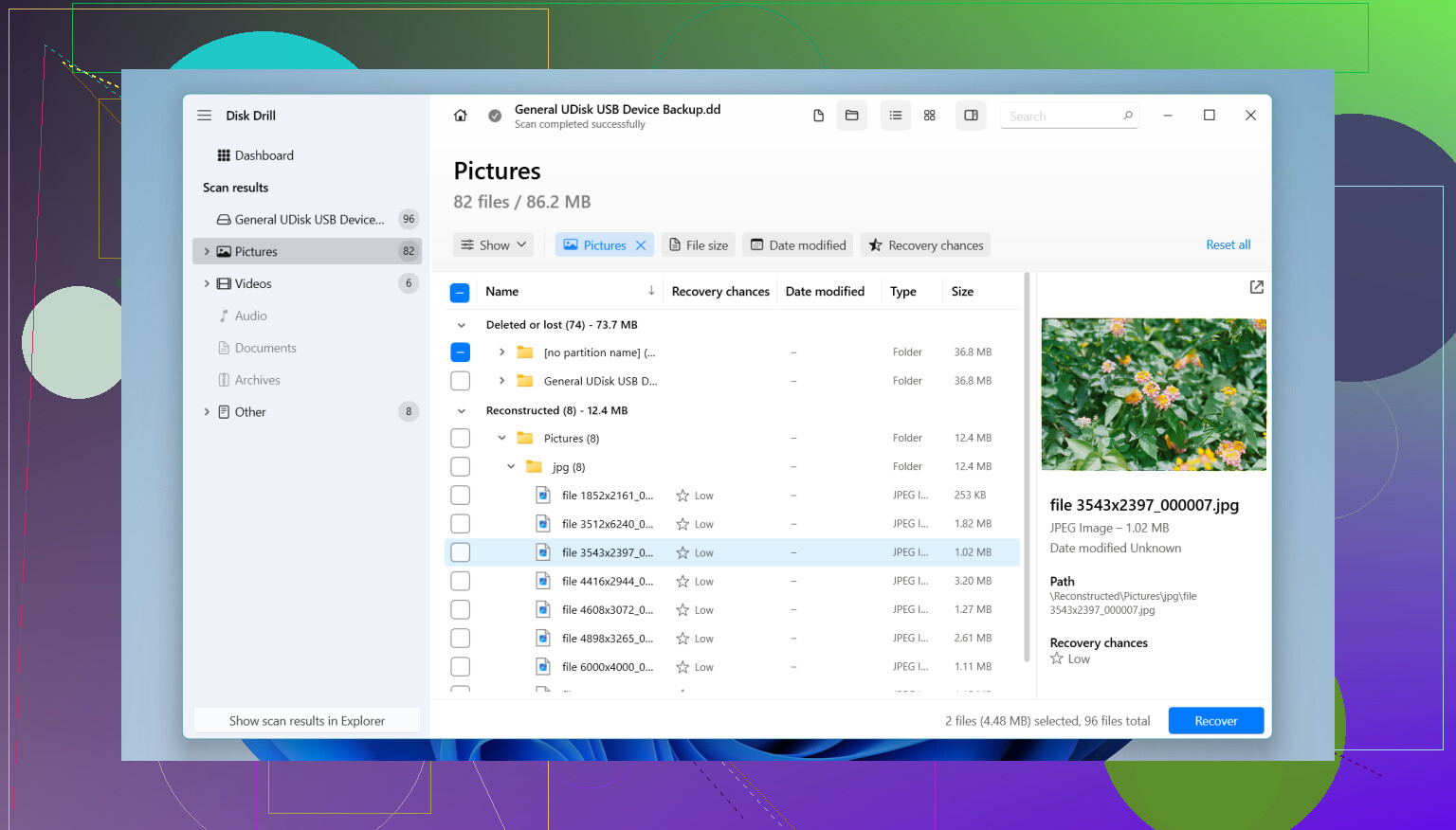
I partly disagree with @himmelsjager and @caminantenocturno on starting with the deepest carve tools too early. If your SD card still mounts, I’d try Disk Drill first because it gives you a clearer idea of what is actually recoverable before dumping thousands of scrambled files.
Why Disk Drill works well here
- good preview support for photos and many videos
- handles damaged file systems better than basic undelete apps
- simple enough that you won’t misclick your way into a worse situation
- useful if files vanished after a move instead of a full physical card failure
Pros
- easy interface
- strong photo/video detection
- previews help avoid recovering junk
- can create a disk image first
Cons
- not the cheapest option
- free recovery on Windows is limited
- deep scans can return duplicate results that need sorting
Where I do agree with @mikeappsreviewer is that lightweight tools like Recuva are often too weak once SD cards start acting weird. For free alternatives, I’d look at R-Photo before Recuva if your missing files are mostly media. For advanced cases, R-Studio is stronger but a lot less beginner-friendly.
Short version:
- Disk Drill
- R-Photo
- R-Studio
- PhotoRec if you can live with messy filenames